

How it works
The File Connector indexes user uploaded files. Currently supports.txt, .pdf, .docx, .pptx, .xlsx, .csv,
.md, .mdx, .conf, .log, .json, .tsv, .xml, .yml, .yaml, .eml, and .epub files.
You can also upload a .zip containing these files - If there are other file types in the zip,
the other file types are ignored. There is also an optional metadata line that supports links, document owners,
and time updated as metadata for Hymalaia’s retrieval and AI Answer.
Adding Metadata
The metadata line should be placed at the very top of the file and can take one of two formats:#HYMALAIA_METADATA={"link": "<LINK>"}<!-- HYMALAIA_METADATA={"link": "<LINK>"} -->
- link
- primary_owners
- secondary_owners
- doc_updated_at
- file_display_name
.zip filled with files,
you can define a .hymalaia_metadata.json file and include that in the root of the zip file.
If your zip file structure looks like:
.hymalaia_metadata.json file might look like:
Setting up
Authorization
- No external auth flows required.
- Admins can upload files and make them available to everyone
- [WIP] Admins or normal users will be able to upload files via personal connectors and make them accessible for just themselves.
Indexing
1
Open File connector
Navigate to the Admin Panel and select the File Connector.
2
Upload file
Select a 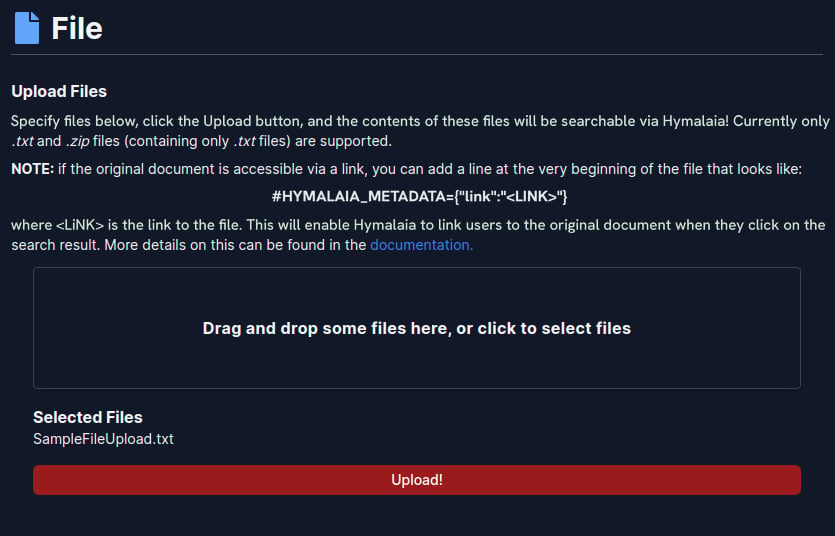
.txt file or a .zip file and click